

Why Gamers Are Switching to a High Performance Gaming PC Build for Streaming

You are in the middle of an important match. Your aim is perfect, your team is counting on you, and your viewers are watching every move. Suddenly, your frame rate stutters. That smooth 144fps you usually enjoy drops to a choppy 60fps because your computer is trying to play the game and process a high-quality stream at the same time. This is the moment many creators realize they need a dedicated streaming computer. A dedicated streaming computer is a separate machine that handles the heavy work of video processing and streaming. This allows your main gaming rig to focus entirely on the game. This dual PC setup is the best choice for anyone serious about their AI-powered gaming experience.
When you use a single system for everything, you are asking one set of hardware to do two very hard jobs. Research shows that streaming and gaming on one PC can cut your performance by nearly half. You might see your frames go from 130fps down to 60fps. That is not just a number. It is the difference between a win and a loss. By moving to a gaming pc high performance setup that includes a second machine, you ensure that your gameplay stays very smooth while your audience gets a clear, professional broadcast. This is why so many professionals are investing in a high performance gaming pc build specifically for their stream output. This second computer acts as a helper that takes the load off your main system.
Key benefits of a dedicated streaming computer:
- Prevents FPS loss - Your gaming PC maintains its full power for the game.
- Higher stream quality - A dedicated CPU or GPU handles the video without having to share parts.
- Stream continuity - If your game crashes or your gaming PC needs a restart, your stream stays live. You can keep talking to your chat while you reboot.
- Better running of many programs - You can run complex overlays, chat bots, and recording software without slowing down your game.
For serious content creators, a dedicated streaming computer solves the most basic problem in the industry. Your gaming PC cannot do two massive jobs at once without making things worse. The good news is that you do not need to spend a fortune on the second machine. It works because it has a single focus. While your main rig handles the AI graphics and physics of the game, your streaming PC focuses only on the broadcast. This focus means you can often build a streaming system for less than the cost of a top-tier gaming upgrade. This approach is part of a modern AI-enhanced gaming strategy that values speed and steadiness. Whether you are building a community or just want the best possible footage for your highlights, a dual-system setup is the way to go. It ensures that your viewers see exactly what you see without any lag or blurriness.
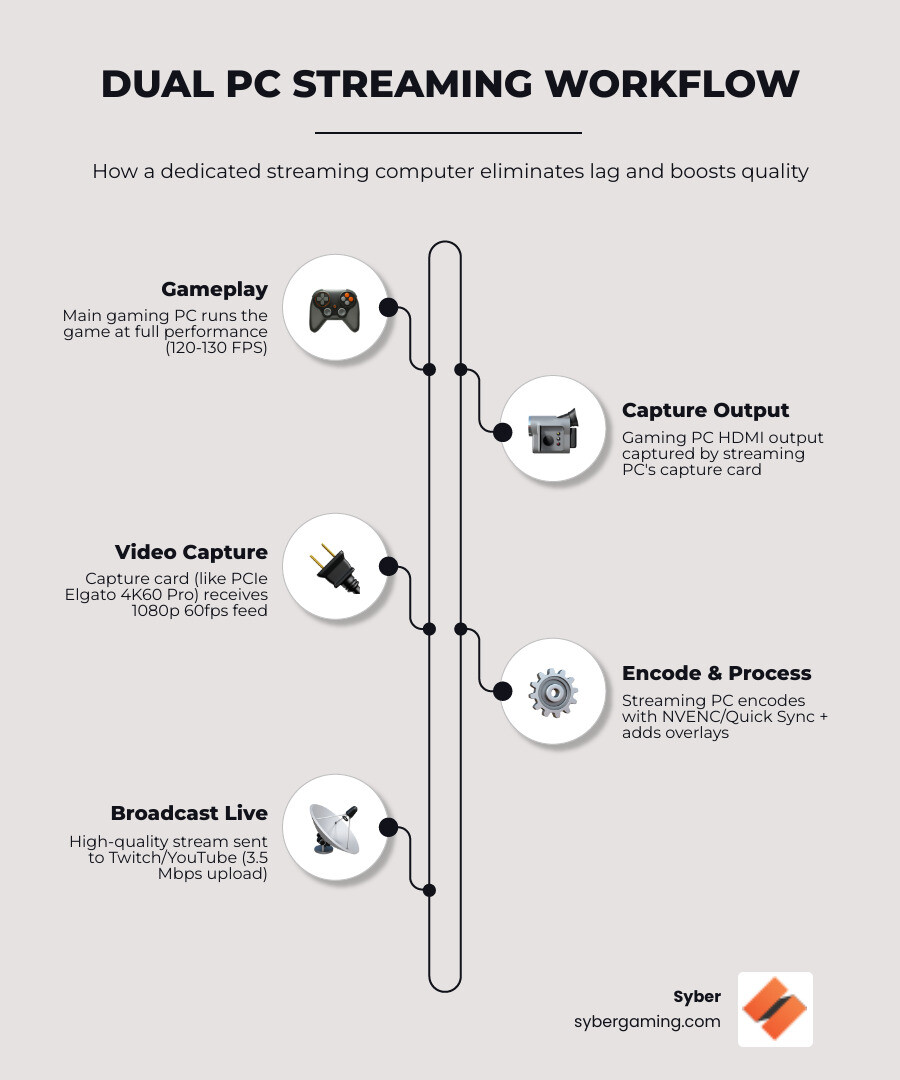
Simple dedicated streaming computer glossary:
The Blueprint for Your AI Gaming PC and Streaming Specs

Building a dedicated streaming computer requires a different mindset than building a standard gaming rig. In a gaming PC, the graphics card is usually the most important part. In a streaming PC, the focus shifts to the video engine. This is where AI in gaming PCs really starts to shine. You are looking for a machine that can handle many tasks at once without breaking a sweat. The goal is total system steadiness. Because this machine is your link to your audience on platforms like Twitch or YouTube, it needs to be very solid. You are not just looking for raw speed. You are looking for an AI gaming PC that can manage multiple data streams at once.
CPU and GPU: The Heart of Your High Performance Desktop PC
The CPU is the brain of your streaming operation. For a dedicated setup, a 6-core processor is the starting point. If you want a perfect 1080p 60fps broadcast, many experts suggest an 8-core processor like the Ryzen 7 5800X. These chips are great at x264 software processing, which provides a very clean image for your viewers. However, you do not have to rely on the CPU alone. Modern AI PC parts include specific hardware tools on graphics cards. NVIDIA NVENC and Intel Quick Sync are hardware tools that take the heavy work off the processor. This allows even a mid-range high performance desktop pc to produce a professional stream. This is a key part of modern AI gaming performance. By using these specific chips, you get better quality without needing a massive, expensive processor. This makes the whole system run better and stay cooler during long hours of use.
If you want to see how these parts work together in a real studio, you can check out the Syber Lab: Where Content Creation Happens. It shows how professionals balance these specs for the best results.
RAM and Storage for Running Many Programs
While some people say 8GB of RAM is enough, that is rarely true for a modern creator. A dedicated streaming computer should have at least 16GB of RAM. If you plan on running many browser tabs, high-quality overlays, and recording your gameplay at the same time, 32GB is the better choice. This helps with running many programs at once and ensures your system never slows down during a live show. For storage, an NVMe SSD is a must. It makes sure your software like Open Broadcaster Software (OBS) opens fast and your scene transitions are smooth. This is part of the AI system improvement that keeps your stream looking professional. Having a fast drive also means you can save high-quality recordings of your stream without any lag.
Essential Specs Checklist:
- CPU: Intel 12th Gen or Ryzen 5000 Series (6-8 cores) for solid video work.
- GPU: NVIDIA RTX 2060 or better for AI-powered graphics support.
- RAM: 16GB-32GB DDR4/DDR5 (3000MHz+) for smooth use of many programs.
- Storage: 500GB+ NVMe SSD for fast software response.
- PSU: 80 Plus Gold rated for 24/7 steadiness and power use.
The Role of Capture Cards in an AI Gaming Setup
The capture card is the bridge between your two systems. It takes the video signal from your gaming PC and sends it to your streaming PC. Internal PCIe cards, like the Elgato 4K60 Pro, are usually better than USB versions. They offer lower delay and better steadiness. Using an internal card ensures that what you see on your monitor is exactly what your viewers see. This is vital for fast games like Halo Infinite. For more tips on managing these video feeds, look at XSplit: A Multi-Part Guide on Streaming Videogames. This hardware bridge is a core part of any advanced AI gaming setup. It allows the two computers to talk to each other without any loss in quality.
AI Cooling Solutions and Reliability for Professional Broadcasts
Once your hardware is ready, the focus moves to making everything run perfectly. A dedicated streaming computer setup is only as good as its settings. You want to reach a level of AI-driven performance where the software manages resources for you. This lets you focus on talking to your chat and being an entertainer. Modern AI gaming technology is not just about better graphics. It is also about making the system run better. In a dedicated rig, AI can help prioritize your streaming tasks and manage how much heat the system makes. This is where smart cooling solutions come into play. Keeping your system cool is vital for those long 8-hour marathon streams.
Air-Flow Cooling and System Steadiness
Syber focuses on air-flow cooling solutions to keep your system running at its best. When a CPU gets too hot, it slows down to protect itself. This is called thermal slowing, and it leads to dropped frames on your stream. A high-quality case with clear air paths and an 80 Plus Gold power supply ensures your high performance desktop pc stays cool and quiet. The M-Series Gaming PCs are great examples of systems built with this kind of heat management. They use smart air-flow designs to keep the AI PC parts at the right temperature. This steadiness is what separates a hobbyist from a professional. By using fans and good case design, you avoid the risks of leaks or pump failures over time.
Software Setup and Internet Needs
Your software choice, like OBS Studio, Streamlabs, or XSplit, must be set up to match your internet speed. For a clear 1080p 60fps stream, you need an upload speed of at least 3.5 Mbps. However, 6 Mbps is much safer for games with a lot of movement. If your internet is slower, you might need to look into the guide on what resolution to stream at. This will help you decide if 720p is a better fit for your current connection. Always use a wired Ethernet cable for both of your PCs. WiFi is not steady enough for a professional broadcast and can cause your stream to lag or disconnect. A wired connection provides the constant speed needed for a high-quality broadcast.
Build vs. Buy: Choosing Your High Performance Gaming PC Build
When it is time to get your dedicated streaming computer, you have two choices. You can build it yourself or choose a high performance custom prebuilt gaming pc. Building a PC gives you total control, but it also means you are the one who has to fix it if something goes wrong. This can be a big problem for streamers who need to be live every day. Buying a pre built gaming pc customizable from experts like Syber offers a different level of security. Every gaming pc pre built at Syber goes through strict testing. They make sure all the parts work together and are ready for the stress of video work. Plus, you get technical support and a warranty. This gives you peace of mind when your career depends on being online. You do not have to worry about part compatibility or assembly errors.
Whether you want the compact power of the M-Series Gaming PCs or the expansion options of the L-Series Gaming PCs, choosing a system Hand-Built by Experts ensures your broadcast looks professional. You can find custom build gaming pcs that fit your specific needs and budget. Investing in pre built gaming computers that are designed for high performance is the smartest move for any growing creator. It allows you to focus on your content while the hardware handles the technical side. This is the future of the AI-driven gaming rig. By choosing a professional build, you save time and avoid the frustration of troubleshooting hardware issues alone.
Common Pitfalls to Avoid:
- Skimping on the Power Supply: A cheap power unit can cause your system to restart randomly, which kills your stream.
- Ignoring Upload Speed: Always test your internet before you go live. Hardware cannot fix a slow connection.
- Using WiFi: A wired connection is the only way to ensure your stream does not drop out.
- Over-Encoding: Do not try to stream at 4K if your hardware or the platform you use does not support it.
- Poor Cooling: Make sure your case has good air-flow to prevent your system from slowing down during long sessions.
- Low RAM: Trying to run a stream with only 8GB of RAM will lead to crashes and slow performance.
- Wrong Capture Card: Using a low-quality capture card can add delay that makes your audio and video not match.
Ready to take your content to the professional level? Explore our high performance gaming pc build options and find out why serious streamers trust Syber for their AI-ready gaming PC needs. Visit our website today to customize your new streaming setup and start broadcasting with confidence.


.svg)

